CONMON deployment¶
Continuous Monitoring (CONMON) is the federal-compliance discipline of
re-assessing controls on a recurring cadence rather than once a year. Evidentia
ships a read-only cadence library plus a evidentia conmon CLI that answers
"what's due, what's overdue?" against a state file you maintain — and an optional
long-running daemon (evidentia conmon watch) that polls that state and
emits audit events on transitions. This guide covers the cadence library, the
CLI verbs, and both deployment patterns.
Recorded release publication spacing¶
evidentia conmon release-series evaluates publication records already saved by
collect release-cadence --persist. It uses an explicit UTC window, interval and
tolerance, makes no provider call, and does not write to the store. The console
provides the same operation under CONMON > Release series.
This operation does not read the YAML cadence state file below or mark an
obligation complete. Zero or one eligible publication yields insufficient; with
at least two, the result includes leading, adjacent and trailing gaps in exact
microseconds. A continuous result describes recorded upstream publications,
not installed patches or compliance. See the release-cadence guide
for commands, result states and uncertain-persistence handling.
The bundled cadence library¶
Evidentia bundles 7 cadences covering the major federal frameworks. Each cadence pairs a stable slug with a frequency and the regulatory citation that establishes it:
| Slug | Framework | Frequency | Citation |
|---|---|---|---|
nist-800-53-rev5-ca7 |
nist-800-53-rev5 | monthly | NIST SP 800-53 Rev 5 CA-7 |
fedramp-conmon-poam |
fedramp-rev5-mod | monthly | FedRAMP ConMon Strategy & Guide v3.0 §3.4 |
fedramp-conmon-scans |
fedramp-rev5-mod | monthly | FedRAMP ConMon Strategy & Guide v3.0 §3.3 |
fedramp-conmon-annual |
fedramp-rev5-mod | annual | FedRAMP ConMon Strategy & Guide v3.0 §4 |
cmmc-l2-triennial |
cmmc-v2 | triennial | DoD CMMC 2.0 Program Rule (48 CFR Part 204) |
dod-rmf-annual |
dod-rmf | annual | DoDI 8510.01 §3.5.b |
occ-2026-13a-model-risk |
occ-2026-13a | annual | OCC Bulletin 2026-13a; FRB SR 26-02 |
The bundled cadences are immutable templates. Operators with organization-specific
review cycles can register additional cadences at runtime
(evidentia_core.conmon.register_cadence) — see the
CLI reference and the source docstrings.
List what's available, optionally filtered by framework:
evidentia conmon list
evidentia conmon list --framework fedramp-rev5-mod
evidentia conmon list --json
The state file¶
The evidentia conmon query verbs are driven by a state file: a YAML mapping
of {cadence_slug: ISO-8601-date} recording when each cycle was last completed.
# conmon-state.yaml
nist-800-53-rev5-ca7: 2026-05-01
fedramp-conmon-poam: 2026-05-15
fedramp-conmon-annual: 2025-09-30
You can maintain this file by hand, or let Evidentia append to it:
Bash / Linux / macOS
evidentia conmon mark-completed nist-800-53-rev5-ca7 \
  --when 2026-05-28 \
  --state-file conmon-state.yaml
PowerShell (Windows)
evidentia conmon mark-completed nist-800-53-rev5-ca7 `
  --when 2026-05-28 `
  --state-file conmon-state.yaml
Read-only deployment — the CLI query verbs¶
The lightest deployment is no daemon at all: run the query verbs on demand (from a cron job, a CI step, or interactively) against your state file.
What's due soon or overdue (--window-days sets the due-soon horizon;
overdue cycles always surface):
Aggregate cycle health by framework (good for a dashboard or a status report):
evidentia conmon health --state-file conmon-state.yaml --json
evidentia conmon health --state-file conmon-state.yaml --framework nist-800-53-rev5
Compute the next-due date for a single cadence from its last completion:
For deterministic CI snapshots, pass --today YYYY-MM-DD to check / health
so the output does not depend on the wall clock. Pipe the --json output into
your alerting or reporting pipeline.
Viewing continuous-monitoring cadences in the web console¶
If you run the web console (evidentia serve), the Continuous Monitoring
screen is a read-only browser over the same cadence library the CLI exposes —
the bundled cadences plus any registered at runtime. It is the GUI counterpart
to evidentia conmon list: there is no daemon control and no state-file editing
here (the watch daemon is supervised out-of-band), just the catalog of
assessment cycles.
Open the console in a browser and select Continuous Monitoring from the
navigation. Each cadence renders as a card showing its frequency and framework,
its stable slug, and the regulatory citation that establishes it; a cadence with
no citation shows a muted dash. Type a framework identifier into the filter box
(for example fedramp-rev5-mod) to narrow the list to one framework — the same
exact-match filter as evidentia conmon list --framework.
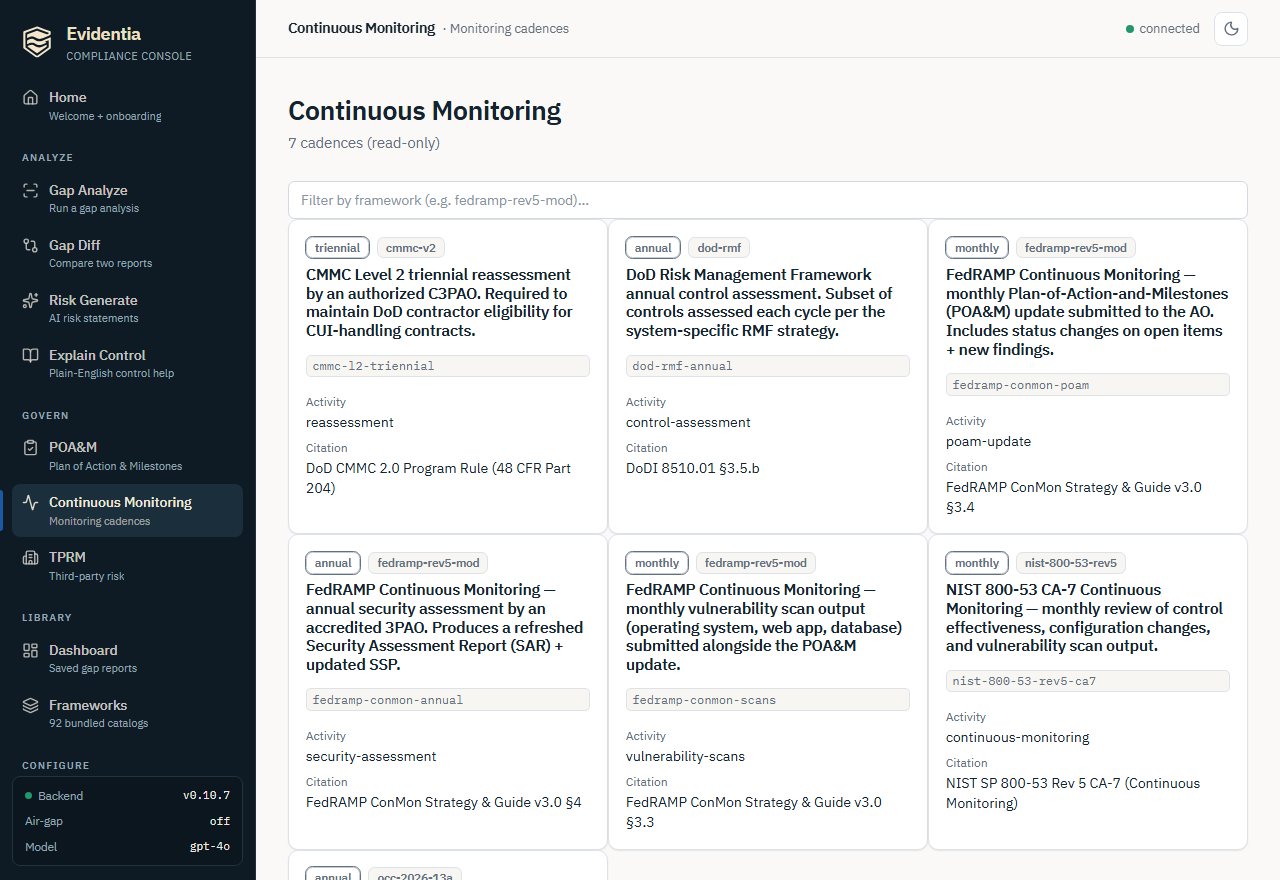
The cadences shown are read-only: editing review cycles or recording completions
is still a CLI/state-file operation (evidentia conmon mark-completed), and live
daemon health is surfaced separately via GET /api/conmon/daemon-status (see
Daemon health visibility below).
Daemon deployment — evidentia conmon watch¶
For hands-off monitoring, evidentia conmon watch runs as a long-lived process
that re-reads the state file on a configurable interval and emits audit events
when a cycle enters due-soon or overdue. It runs in the foreground (no
fork) — you delegate process supervision to systemd / launchd / Windows Service
Manager.
Bash / Linux / macOS
evidentia conmon watch \
  --state-file /var/lib/evidentia/conmon-state.yaml \
  --poll-interval 3600 \
  --window-days 14
PowerShell (Windows)
evidentia conmon watch `
  --state-file C:\ProgramData\evidentia\conmon-state.yaml `
  --poll-interval 3600 `
  --window-days 14
--poll-interval— seconds between polls; minimum 60, default 3600 (1 hour). For monthly/quarterly CONMON cadences, one hour is the practical sweet spot.- The daemon re-loads the state file each poll, so you can run
evidentia conmon mark-completedwithout restarting it. - It handles SIGINT (and SIGTERM on POSIX) with graceful shutdown.
Alerting¶
Wire SMTP and/or webhook alerting so transitions reach a human. Alerting flags
require an --alert-dedup-file so the same (slug, state) does not re-alert on
every poll within the suppression window:
Bash / Linux / macOS
evidentia conmon watch \
  --state-file /var/lib/evidentia/conmon-state.yaml \
  --alert-dedup-file /var/lib/evidentia/conmon-dedup.json \
  --webhook-url https://hooks.example.com/conmon \
  --webhook-secret-file /etc/evidentia/secrets/webhook-secret
PowerShell (Windows)
evidentia conmon watch `
  --state-file C:\ProgramData\evidentia\conmon-state.yaml `
  --alert-dedup-file C:\ProgramData\evidentia\conmon-dedup.json `
  --webhook-url https://hooks.example.com/conmon `
  --webhook-secret-file C:\ProgramData\evidentia\secrets\webhook-secret
Secrets are passed via --*-file paths or env vars
(EVIDENTIA_SMTP_PASSWORD, EVIDENTIA_WEBHOOK_SECRET) — never as a CLI value
flag. Webhook URLs are validated at startup: http:// (cleartext) and
private-network destinations are rejected by default to close an SSRF /
cloud-metadata-exfiltration vector — opt in with --webhook-allow-plaintext /
--webhook-allow-private-network only for legitimate internal receivers.
Inspect the dedup state at any time:
Running under a service manager¶
The daemon is meant to be supervised. Reference units for systemd (Linux),
launchd (macOS), and Windows Service Manager (sc.exe) — plus
credential-injection patterns, the webhook SSRF threat model, and the lifecycle
audit events — are in the in-repo runbook
docs/conmon-daemon-deployment.md.
Windows shutdown latency: on Windows, a Ctrl+C / service-stop may take up to one
--poll-intervalto react (signal delivery during a blocking wait is deferred). For interactive testing set--poll-interval 60.
Daemon health visibility¶
For operator health-checks, point the daemon at a status sidecar and a rolling history file, then read them back via the REST API:
Bash / Linux / macOS
evidentia conmon watch \
  --state-file /var/lib/evidentia/conmon-state.yaml \
  --status-file /var/lib/evidentia/conmon-status.json \
  --history-file /var/lib/evidentia/conmon-history.jsonl
PowerShell (Windows)
evidentia conmon watch `
  --state-file C:\ProgramData\evidentia\conmon-state.yaml `
  --status-file C:\ProgramData\evidentia\conmon-status.json `
  --history-file C:\ProgramData\evidentia\conmon-history.jsonl
Configure the web server with the matching EVIDENTIA_CONMON_DAEMON_STATUS_FILE
/ EVIDENTIA_CONMON_DAEMON_HISTORY_FILE env vars to expose
GET /api/conmon/daemon-status and /api/conmon/daemon-history.
What's next¶
- Track remediation alongside cadences: Manage POA&M — POA&M items are the work CONMON cycles surface.
- Full flag reference: CLI reference →
evidentia conmon.
Got stuck?¶
Unknown CONMON cadence slug— runevidentia conmon listto confirm the exact slug; only the 7 bundled (plus any runtime-registered) slugs are valid.- Daemon exits immediately with
ValueError— a webhook URL was rejected by the SSRF guard. The error names the rejected IP and the opt-in flag that would permit it. - Alerting flag set but no
--alert-dedup-file— the dedup file is required whenever any--smtp-*/--webhook-*flag is set.