Push findings to Jira, ServiceNow, and BI tools¶
Once a gap analysis has surfaced your open compliance gaps, the next step is to
get them in front of the people who close them — and to keep your dashboards
honest. The evidentia integrations group does both: it pushes open gaps into a
ticketing system (Jira Cloud, ServiceNow) so each gap becomes a tracked,
assignable record, and it publishes a gap inventory + risk register + run
audit trail to a BI tool (Tableau, Power BI) so leadership sees live
posture instead of a stale slide. This guide walks the full workflow with the
evidentia integrations commands and the browser equivalent.
This is a credentialed, external-write surface. Every push / publish / sync verb reaches out to a system you do not control and creates records there. That has two consequences worth stating up front:
- Credentials are never passed on the command line or in a form. Every integration reads its secrets from server-side environment variables (and, for Tableau / Power BI, from env vars you name rather than whose value you type). Nothing in this guide ever asks you to paste a token into a flag or a browser field.
- The writes are irreversible from Evidentia's side. A pushed Jira issue or
ServiceNow incident stays in that system until someone there closes it. Test
the connection first, and use the safety rails (
--max, dry-run) on the first run.
Prerequisites¶
- A gap-analysis report JSON. Every verb operates on the output of
evidentia gap analyze --output gap-report.json(see Run a gap analysis). Push verbs act on the report's open gaps; the publish verbs ship the whole inventory. - The integration extra installed. Tableau and Power BI ship as optional
extras:
pip install 'evidentia-integrations[tableau]'/'evidentia-integrations[powerbi]'. Jira and ServiceNow ship with the CLI. - Credentials in the environment for whichever target you use (see each section below). For the web console path, the server process also needs these env vars set, plus API authentication configured — covered in § In the web console.
Step 1 — Verify your credentials before you write anything¶
Both ticketing integrations have a read-only test verb that probes the
connection without creating a single record. Run it first — a failed test is a
cheap, reversible way to catch a wrong URL or an expired token.
Jira reads four environment variables — JIRA_BASE_URL, JIRA_EMAIL,
JIRA_API_TOKEN, JIRA_PROJECT_KEY (and an optional JIRA_ISSUE_TYPE,
defaulting to Task):
Bash / Linux / macOS
export JIRA_BASE_URL="https://acme.atlassian.net"
export JIRA_EMAIL="compliance-bot@acme.example"
export JIRA_PROJECT_KEY="SEC"
# Set JIRA_API_TOKEN in your shell yourself — never echo a secret.
evidentia integrations jira test
PowerShell (Windows)
$env:JIRA_BASE_URL = "https://acme.atlassian.net"
$env:JIRA_EMAIL = "compliance-bot@acme.example"
$env:JIRA_PROJECT_KEY = "SEC"
# Set JIRA_API_TOKEN in your shell yourself — never echo a secret.
evidentia integrations jira test
ServiceNow reads EVIDENTIA_SERVICENOW_INSTANCE_URL,
EVIDENTIA_SERVICENOW_USER, EVIDENTIA_SERVICENOW_PASSWORD, and an optional
EVIDENTIA_SERVICENOW_TABLE (default incident):
Bash / Linux / macOS
export EVIDENTIA_SERVICENOW_INSTANCE_URL="https://acme.service-now.com"
export EVIDENTIA_SERVICENOW_USER="evidentia.integration"
# Set EVIDENTIA_SERVICENOW_PASSWORD in your shell yourself.
evidentia integrations servicenow test
PowerShell (Windows)
$env:EVIDENTIA_SERVICENOW_INSTANCE_URL = "https://acme.service-now.com"
$env:EVIDENTIA_SERVICENOW_USER = "evidentia.integration"
# Set EVIDENTIA_SERVICENOW_PASSWORD in your shell yourself.
evidentia integrations servicenow test
Each test exits 0 on success and 1 on any credential or API failure, so it
slots cleanly into a CI pre-flight check.
Step 2 — Push open gaps to a ticketing system¶
Jira¶
push creates one Jira issue per open gap in the report. Any gap that already
carries a jira_issue_key is skipped, so re-running is safe and won't
duplicate issues. On a first run, cap the blast radius with --max and skip the
write-back with a dry-run (--output -):
evidentia integrations jira push --gaps gap-report.json --severity critical,high --max 25 --output -
When you are happy with the dry run, drop --output - to let push write the
stamped issue keys back into the report (it overwrites the input file by default,
or pass --output updated-report.json to write a copy):
--severity (-s) takes a comma-separated list and defaults to all severities.
push exits 0 when every create succeeds and 1 when any errored.
ServiceNow¶
push creates a record (an incident, an sn_grc_issue, or a custom-table
record, per EVIDENTIA_SERVICENOW_TABLE) per open gap. It is idempotent by
correlation_id: re-running on the same report detects records it already
created and reports them as existing rather than creating duplicates.
The --force flag creates new records even when a matching correlation_id
already exists — rarely needed, mostly for testing.
Step 3 — Sync ticket status back into the report (Jira)¶
After your team works tickets in Jira, pull their current status back so
Evidentia's gap statuses reflect reality. sync reads the status of every
linked gap (each gap that carries a jira_issue_key) and maps it back onto the
report:
Like push, sync overwrites the input report by default; pass --output
(-o) to write a copy. To see exactly how Jira statuses translate to
Evidentia's GapStatus, print the mapping table:
Add --format json (-f json) for the machine-readable form. (ServiceNow has
no sync verb at this release — it is push-only.)
Step 4 — Publish to a BI tool¶
The BI verbs publish three datasets — the gap inventory, the risk register, and the collection-run audit trail — so a Tableau or Power BI dashboard can chart posture directly.
Tableau¶
The Tableau PAT name and secret are read server-side from env vars — you
pass the names of those env vars, never the values. The defaults are
TABLEAU_PAT_NAME and TABLEAU_PAT_SECRET. Because the command takes a
--server-url and reads named env vars, it is shell-specific:
Bash / Linux / macOS
export TABLEAU_PAT_NAME="evidentia-pat"
# Set the secret in your shell; never echo it.
export TABLEAU_PAT_SECRET="…"
evidentia integrations tableau publish \
  --gaps gap-report.json \
  --server-url https://us-east-1.online.tableau.com \
  --site-id acmecompliance \
  --project-name "Compliance"
PowerShell (Windows)
$env:TABLEAU_PAT_NAME = "evidentia-pat"
# Set the secret in your shell; never echo it.
$env:TABLEAU_PAT_SECRET = "…"
evidentia integrations tableau publish `
  --gaps gap-report.json `
  --server-url https://us-east-1.online.tableau.com `
  --site-id acmecompliance `
  --project-name "Compliance"
--server-url must carry no trailing slash. --site-id is the Tableau
Cloud site slug (leave empty for a Tableau Server default site).
--project-name defaults to default. By default a re-publish overwrites
the existing data sources; pass --no-overwrite to publish in CreateNew mode and
fail if they already exist. Add --risks <path> to publish a JSON list of
RiskStatement objects as the evidentia-risks dataset.
Power BI¶
Power BI publishes the same datasets as Push Datasets via an Azure AD
service principal. The client secret is read server-side from the env var you
name with --client-secret-env (default POWERBI_CLIENT_SECRET); the
--workspace-id, --tenant-id, and --client-id are non-secret identifiers
passed as flags:
Bash / Linux / macOS
# Set POWERBI_CLIENT_SECRET in your shell yourself; never echo it.
evidentia integrations powerbi publish \
  --gaps gap-report.json \
  --workspace-id 00000000-0000-0000-0000-000000000000 \
  --tenant-id 11111111-1111-1111-1111-111111111111 \
  --client-id 22222222-2222-2222-2222-222222222222
PowerShell (Windows)
# Set POWERBI_CLIENT_SECRET in your shell yourself; never echo it.
evidentia integrations powerbi publish `
  --gaps gap-report.json `
  --workspace-id 00000000-0000-0000-0000-000000000000 `
  --tenant-id 11111111-1111-1111-1111-111111111111 `
  --client-id 22222222-2222-2222-2222-222222222222
The service principal needs Dataset.ReadWrite.All on the target workspace. By
default each publish is a full refresh (clear-then-push); pass --no-clear to
append rows to the existing datasets instead. Add --risks <path> to include a
risk-register dataset.
In the web console¶
Everything above is mirrored on the Integrations screen. Start the server
with evidentia serve (it needs the [gui] extra — see
Serve the local web UI) and open Integrations from the
sidebar (route /integrations). The page is organized as one card per system —
Jira, ServiceNow, Tableau, Power BI — backed by the
/api/integrations/... routes.
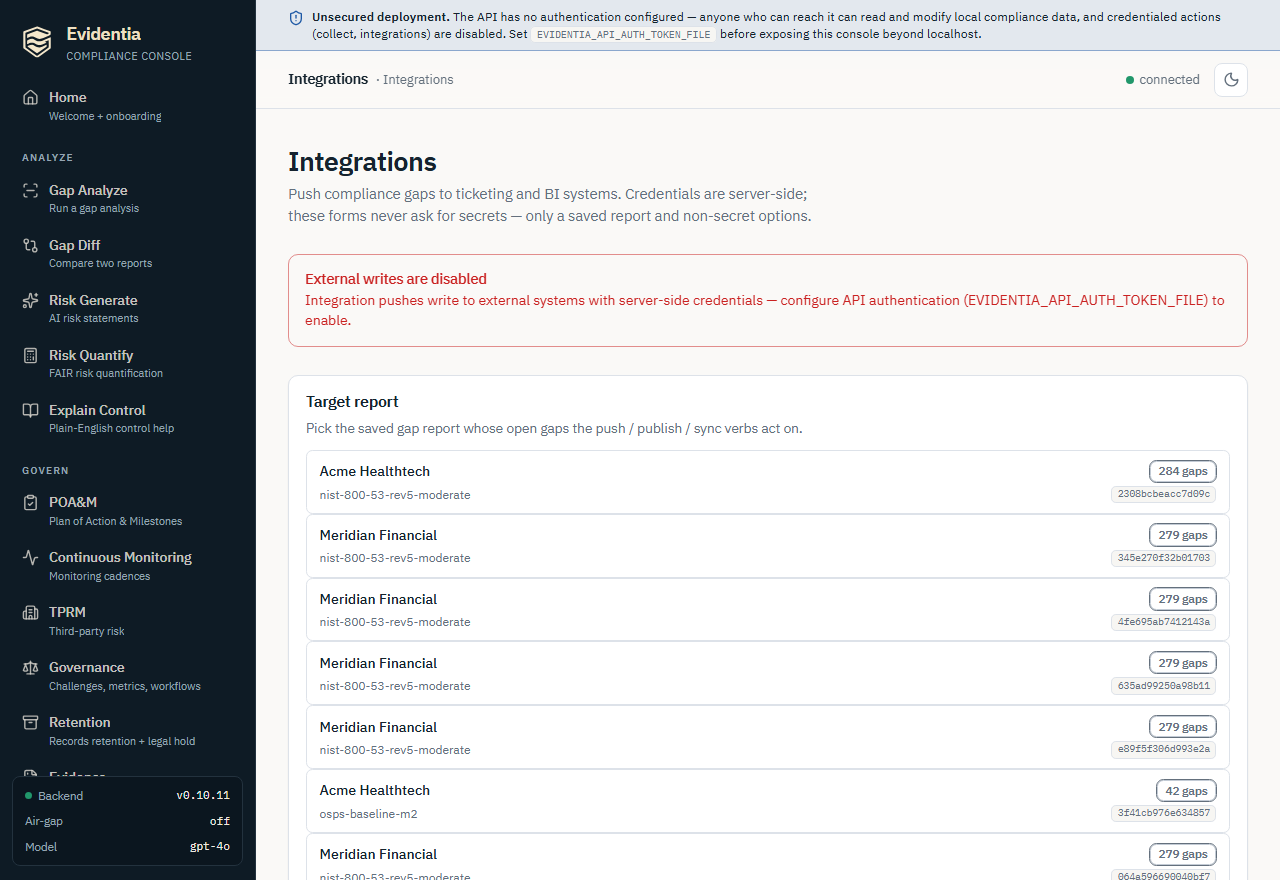
The console preserves the same secrets discipline as the CLI: the forms never ask for a token. Credentials are sourced server-side from the same environment variables, so the server process must have them set before you start it. The forms carry only a saved-report key plus non-secret options.
- Pick a target report. The Target report card lists your saved gap
reports (each showing the organization, framework set, gap count, and report
key). Pick one — every push / publish / sync verb acts on its open gaps, and
the write controls stay disabled until a report is selected. If the list is
empty, run
evidentia gap analyzefirst to populate the gap store. - Run the read-only probes freely. Test connection (Jira / ServiceNow) and Jira's Status map create no records and stay enabled regardless of auth state. Use them to confirm the server-side credentials are wired before you write anything. Results render as structured text below the buttons.
- Confirm before every external write. Each write verb — Push gaps,
Sync status, Publish — is guarded by a two-step confirmation: the
first click reveals "This writes to <system>. Continue?" and only the
Confirm click fires the request. This interstitial exists because the
write is irreversible. Errors (a
503not-configured, a404unknown report key) surface in a red alert with the server's payload. - Auth-gating of the write buttons. On an anonymous deployment — one
with no API authentication configured — every write verb is disabled
with the note "External writes are disabled." Because these verbs perform
credentialed external writes with server-side secrets, the console requires
the server to have API auth configured (set
EVIDENTIA_API_AUTH_TOKEN_FILEand restartevidentia serve) before it will enable them. The read-only test / status-map probes stay enabled either way. This is the browser-equivalent of the CLI relying on a credentialed operator shell.
The console reads
GET /api/healthonce on load to learn whether auth is configured (auth_configured), then callsPOST /api/integrations/jira/push/{report_key}(and the analogoussync,servicenow/push,tableau/publish,powerbi/publishroutes). The ServiceNow push is additionally written to the structured audit log (evidentia.integrations.servicenow_push) with the report key, target table, and outcome counts — never any secret value.
What's next¶
- Generate the report these verbs consume: Run a gap analysis.
- Track remediation alongside the tickets: Manage POA&M —
a POA&M milestone's
--evidence-refcan point at the Jira key or ServiceNow record a push created. - Quantify what the open gaps cost:
Generate and quantify risk — the risk
register the BI publishes can carry these
RiskStatementobjects. - Run the console behind a real auth boundary: Serve the local web UI.
Got stuck?¶
testexits 1 / "Jira API call failed" — the credentials or URL are wrong, or the token expired. Re-check the fourJIRA_*env vars (or theEVIDENTIA_SERVICENOW_*set) in the server's environment.testnever prints the token, so a clean re-export is safe.- Console write buttons are greyed out with "External writes are disabled":
the deployment is anonymous. Configure API authentication
(
EVIDENTIA_API_AUTH_TOKEN_FILE), restartevidentia serve, and front the console with a reverse proxy that injects the bearer header (the console sends none itself; see the serve guide). The read-only probes work without it. - "Select a target report above to enable this write." — no report is
selected in the Target report card. Pick one; if the list is empty, run
evidentia gap analyzeto populate the gap store. - A
503"integration not installed" — Tableau / Power BI ship as extras. Install withpip install 'evidentia-integrations[tableau]'or'[powerbi]'. - Jira
pushskipped gaps it "should" have created — any gap already carrying ajira_issue_keyis skipped by design (re-run safety). Inspect the report, or push to a fresh report copy. - ServiceNow
pushreported records as existing — that is the idempotency guard working: matchingcorrelation_ids are not duplicated. Use--forceonly if you truly need duplicate records (rare; mostly for testing).