Emit a control-to-threat traceability matrix
A traceability matrix is the auditor-facing record of which threats each control
mitigates. Evidentia takes a small declarative matrix — a list of control→threat
mappings — and emits it as a signable OSCAL profile: the profile imports your
control catalog and annotates each control with a link rel="mitigates" pointing
at integrity-hashed threat resources in the document's back-matter. You can then
GPG- or Sigstore-sign the emitted profile so an auditor can verify, end to end,
that the coverage claims came from your instance and have not been altered.
This guide walks the full workflow with the evidentia traceability emit command,
then shows the read-only equivalent in the web console.
Representation note. A static control↔threat matrix is emitted as an OSCAL profile — deliberately not Assessment Results (which models an assessment activity) and not the OSCAL
mappingmodel (which is control↔control only and cannot target a threat id). The relationship vocabulary (mitigates,detects, …) is a domain mitigation vocabulary, not NIST OLIR.
Prerequisites
- A control catalog the profile can import — referenced by
catalog_href(for examplecatalogs/nist-800-53-rev5-moderate.json). The matrix annotates this catalog's controls; it does not need the catalog file present to emit, but the href is what downstream tools resolve. - A traceability matrix input file (JSON or YAML) describing your mappings. You author this by hand or generate it from your threat-modeling notes — see Step 1.
- (Optional) signing material. A GPG key id for an air-gap detached signature,
or the
[sigstore]extra plus network + an OIDC credential for a keyless Sigstore signature. See Sign and verify evidence for the signing setup that this command reuses.
The matrix input
The input is a TraceabilityMatrix: a few header fields plus a list of mappings.
Each mapping says one control mitigates one threat, with a relationship and a
coverage strength.
| Field | Required | Notes |
|---|---|---|
title |
yes | Human-readable matrix title. |
catalog_href |
yes | OSCAL href of the control catalog the profile imports. |
framework_id |
yes | Framework identifier, e.g. nist-800-53-rev5-moderate. |
crosswalk_source |
no | Provenance of the mappings; defaults to self-attested. |
mappings[] |
yes | One or more control→threat mappings (see below). |
Each mapping carries:
control_id(required) — control id from the imported catalog, e.g.AC-2.threat_id(required) — canonical threat id, e.g.T1078,CWE-79,CAPEC-66.threat_framework(required) — the threat taxonomy:mitre-attack,cwe, orcapec.relationship—mitigates(default),partially-mitigates,compensating, ordetects.coverage—full(default),partial, orcompensating.threat_name— optional human-readable name. A given threat id must use one consistent name across the matrix, or emit fails fast.notes— optional operator rationale.
Step 1 — Author the matrix input
Create a YAML (or JSON) file describing the mappings. A minimal example:
title: "Control-to-Threat Traceability: Acme moderate baseline"
catalog_href: "catalogs/nist-800-53-rev5-moderate.json"
framework_id: "nist-800-53-rev5-moderate"
crosswalk_source: "self-attested"
mappings:
  - control_id: "AC-2"
    threat_id: "T1078"
    threat_framework: "mitre-attack"
    threat_name: "Valid Accounts"
    relationship: "mitigates"
    coverage: "partial"
  - control_id: "AC-6"
    threat_id: "T1078"
    threat_framework: "mitre-attack"
    threat_name: "Valid Accounts"
    relationship: "partially-mitigates"
    coverage: "partial"
Step 2 — Emit the OSCAL profile
--input / -i (the matrix file) and --output / -o (where to write the
profile JSON) are both required:
On success the command reports the count of mappings and distinct controls:
The emitted file is a single OSCAL profile document. Its metadata records the
matrix title, the Evidentia version, the OSCAL schema version, and the
crosswalk-source; each mapping becomes a link rel="mitigates" addition on the
target control, and each distinct threat is embedded as a SHA-256-hashed
back-matter.resources[] entry for tamper-evidence. Re-emitting the same input
reproduces byte-identical resource ids and digests (the ids are derived
deterministically), so the output is stable for diffing and CI.
If the matrix parses but has no mappings, emit refuses with "The matrix has no mappings — nothing to emit." and exits non-zero.
Step 3 — (Optional) sign the profile
Signing is the same path the rest of Evidentia's OSCAL signing uses. Pass a GPG
key id to write a detached .asc next to the profile — the air-gap-friendly
default:
evidentia traceability emit --input matrix.yaml --output traceability-profile.json --sign-with-gpg YOUR_KEY_ID
This writes traceability-profile.json plus traceability-profile.json.asc.
For a keyless Sigstore signature (writes <output>.sigstore.json), add
--sign-with-sigstore. Sigstore needs network access to Fulcio + Rekor and an
OIDC credential, so it is refused in --offline mode. In CI you can pass an
explicit token rather than relying on auto-detection. Because this block uses a
trailing line-continuation, it is shown per shell:
Bash / Linux / macOS
evidentia traceability emit \
  --input matrix.yaml \
  --output traceability-profile.json \
  --sign-with-sigstore \
  --sigstore-identity-token "$OIDC_TOKEN"
PowerShell (Windows)
evidentia traceability emit `
  --input matrix.yaml `
  --output traceability-profile.json `
  --sign-with-sigstore `
  --sigstore-identity-token $env:OIDC_TOKEN
You can pass both --sign-with-gpg and --sign-with-sigstore in one emit for
defense-in-depth.
Step 4 — Verify the signature
The emitted profile verifies through the same evidentia oscal verify path as
any signed OSCAL document. --require-signature fails if no detached signature
is found next to the file; either a GPG .asc or a Sigstore bundle satisfies
the requirement:
It exits 0 on success and 1 otherwise, so it drops straight into a CI gate.
For an air-gap-only check (no Sigstore/Rekor contact) add --no-check-sigstore;
for machine-readable output add --json. See
Sign and verify evidence for the full verification
surface, including pinning an expected Sigstore signer identity.
Emitting from the web console
Everything above — except signing — is also available in the browser. Start the
server with evidentia serve and open the Traceability screen from the
sidebar (route /traceability). The screen calls POST /api/traceability/emit.
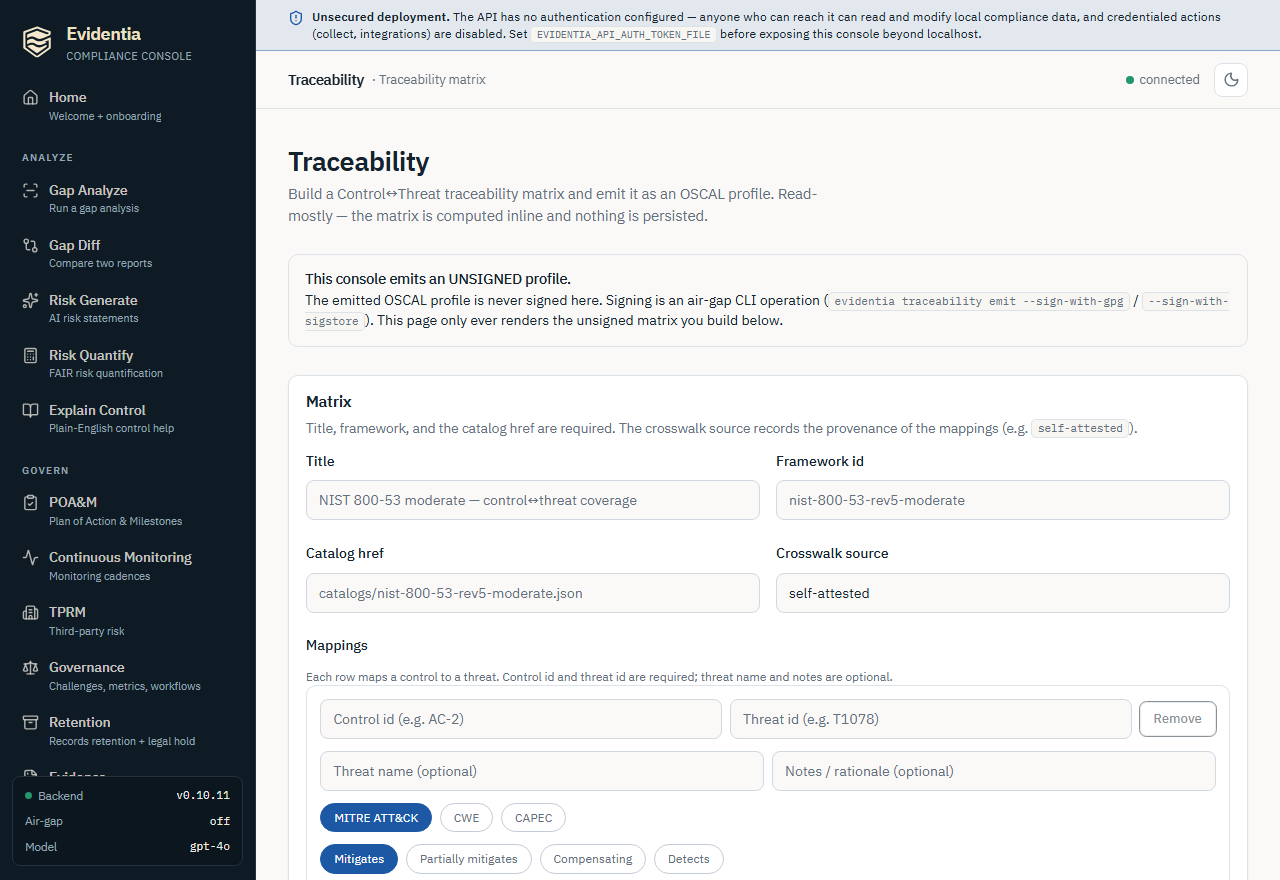
The console is read-mostly and never signs. It builds the matrix inline from
the form, posts it, and renders the returned unsigned OSCAL profile as
pretty-printed JSON. A banner on the page states this explicitly: signing
(--sign-with-gpg / --sign-with-sigstore) is an air-gap CLI operation by
design and is deliberately not exposed over HTTP.
- Fill the matrix header. Enter a Title, a Framework id, and a
Catalog href — all three are required. The Crosswalk source is optional
and defaults to
self-attested. - Add mappings. Each mapping row takes a Control id and a Threat id (both required), an optional Threat name and Notes, plus three pill pickers: Threat framework (MITRE ATT&CK / CWE / CAPEC), Relationship (Mitigates / Partially mitigates / Compensating / Detects), and Coverage (Full / Partial / Compensating). Use Add mapping for more rows and Remove to drop one (the last remaining row cannot be removed).
- Emit. The Emit button stays disabled until the title, framework id,
catalog href, and at least one mapping with both a control id and a threat id
are filled. Clicking it posts the matrix and renders an Emitted OSCAL
profile card — flagged Unsigned — with a small control/threat-link count
summary and the full profile JSON. A matrix with no usable mappings returns a
400("nothing to emit"); a shape-invalid body returns a422, surfaced as an inline error. - Sign it from the CLI. Nothing is persisted server-side, so to produce a
signed artifact, copy the matrix into an input file and run
evidentia traceability emit … --sign-with-gpg/--sign-with-sigstoreas in Step 3.
What's next
- Sign and verify the emitted profile:
Sign and verify evidence — the GPG / Sigstore
signing and
oscal verifysurface this command reuses. - The integrity model behind the hashed threat resources: Concepts → Evidence integrity.
- Find the controls worth mapping: Run a gap analysis surfaces your in-scope controls.
- Run everything offline: Air-gapped install — emit and GPG-sign work air-gapped; Sigstore signing does not.
Got stuck?
- "The matrix has no mappings — nothing to emit." — your
mappingslist is empty (or every row was dropped). Add at least one mapping with acontrol_idandthreat_id. - "threat … has conflicting names …" — the same threat id appears with two
different
threat_namevalues. A threat id must map to one name across the whole matrix; pick one. Invalid traceability matrix input:on emit — the input failed validation (a missing required field, or an out-of-range enum like an unknownthreat_framework/relationship/coverage). Check the field against The matrix input above.- "No such command 'traceability'" — your installed
evidentiapredates v0.10.11. Upgrade to v0.10.11 or later. - Sigstore signing fails in
--offlinemode — that is by design. Sigstore needs Fulcio + Rekor; use--sign-with-gpgfor air-gapped signing instead.