Run evidence collectors¶
Collectors retrieve source evidence through the evidentia collect CLI group
and the Collect screen in the web console. Credentialed providers read cloud,
identity, database and vendor-risk systems. Some collectors also accept local
exports or reviewed packaged sources. Findings, coverage and control mappings
depend on the collector: Entra/M365, retention, incident clocks and public registries return full
collection results with explicit scope and limitations. Registry observations
keep compliance status unknown.
This is the operator reference for the whole collector matrix. If you have never run a collector before, start with the gentler end-to-end walkthrough in Getting started → Your first evidence collection, which wires the GitHub collector start-to-finish; this guide assumes you already understand that shape and focuses on the breadth of providers, the credential model, and the network/SSRF guards.
Import local SCAP results¶
The Collect > SCAP tab and collect scap accept XCCDF 1.2 Benchmark
results, standalone TestResult documents with their required inert benchmark
reference, and OVAL 5.8, 5.11.2 or 5.12.3 core results. Select the exact profile,
assessment occurrence and local XML file. These imports preserve native outcomes
and completion provenance; they do not run scanners or establish compliance.
A full result can succeed with no evidence artifact. OVAL completion requires a separate, source-bound assertion rather than an inference from its generator timestamp. Saving is a separate action, and source references remain inert. The SCAP operator guide explains assertions, CLI flags, API authentication, downloads and finite limits.
Observe public release publications¶
The Collect > Release cadence tab and collect release-cadence observe
public GitHub release metadata with no GitHub credential. Choose an owner,
repository and full_releases or all_published channel. The default poll
returns the full bounded result without opening the evidence store; saving
requires an explicit request and write permission.
Use CONMON > Release series or conmon release-series to evaluate local
recorded publication spacing. This is upstream-release evidence, not proof of
installed patches or remediation. The release-cadence guide
explains exact commands, authentication, persistence outcomes, source limits and
offline series states. Unlike provider-specific collectors with transport
overrides, this profile fixes the public GitHub destination and refuses redirects.
What this surface is for¶
- Pull live posture from a source system and turn it into control-mapped
findings you can fold into a gap analysis (
--format oscal-ar) or convert to OCSF for a SIEM. - Cover many providers — cloud (AWS), code (GitHub), identity (Okta, Google Workspace), data stores (PostgreSQL, MySQL, SQLite, MS SQL, Oracle, Databricks, Snowflake), and vendor-risk platforms (Vanta, Drata, BitSight, SecurityScorecard).
- Ingest or convert OCSF — pull third-party OCSF findings in (
collect ocsf) or push Evidentia findings out to an OCSF bundle (collect convert).
Every credentialed collector is read-only by design. The SQL adapters even run
a write-privilege probe on first connect and emit an EVIDENTIA-WRITE-PRIV-DETECTED
finding (mapped to NIST AC-6) if they find more access than they should have.
The credential model (read this first)¶
This is the highest-risk surface in Evidentia, so the credential handling is deliberate and worth understanding before you run anything:
- Secrets never pass through a CLI value flag or a request body. Tokens and
passwords are sourced from server-side environment variables (or the
provider SDK's own credential chain). For example the GitHub collector reads
$GITHUB_TOKEN; Okta reads$OKTA_API_TOKEN; the SQL adapters read a password from an env var you name with--password-env. The collectors refuse a secret passed as a flag. - In the web console, the forms only carry non-secret parameters — region,
repo, host, options. The browser never sees a key value, and the Status tab
reports only
configured: true/falseplus the env-var name a token came from, never the value. - Networked collectors block private IPs by default (
--block-private-ips). This SSRF guard refuses any host that resolves to a private / loopback / link-local / multicast / reserved range — including the cloud instance-metadata endpoint169.254.169.254— before a socket opens. You opt out per-call with--allow-private-ipsonly for a trusted internal endpoint.
Prerequisites¶
- Evidentia installed (
pip install evidentia; verify withevidentia version). - The provider extra for whatever you are collecting — for example
pip install "evidentia-collectors[aws]"orpip install "evidentia-core[ocsf]"for the OCSF verbs. A missing extra surfaces as a clear install hint rather than a stack trace. - The relevant credential exported in your shell (CLI) or set in the server's
environment (console). See each provider's
--helpfor the exact env-var name.
Step 1 — See what you can collect¶
List the whole collector matrix:
You will see the credentialed providers (aws, github, okta,
google-workspace, entra-m365, retention, sql, databricks, snowflake, vanta, drata, bitsight,
securityscorecard) plus the two OCSF verbs (ocsf to ingest, convert to
emit). Each subcommand has its
own --help with the exact flags and the env var its secret is read from:
Step 2 — Configure the credential¶
Each collector documents its credential source in --help. The token/password is
always read from the environment, never a flag. For GitHub:
Bash / Linux / macOS
PowerShell (Windows)
For the SQL adapters, the password lives in the env var named by --password-env
(default differs per adapter, e.g. EVIDENTIA_POSTGRES_PASSWORD). For the
SaaS/vendor-risk collectors, set the provider's token env var (OKTA_API_TOKEN,
GOOGLE_WORKSPACE_ACCESS_TOKEN, VANTA_API_TOKEN, DRATA_API_TOKEN,
BITSIGHT_API_TOKEN, SECURITYSCORECARD_API_TOKEN, SNOWFLAKE_PASSWORD, etc.).
Step 3 — Run a collector¶
Run one provider and write the findings JSON to a file with --output (or omit it
to print to stdout). A plain evidentia collect ... line works the same in any
shell:
A few representative providers:
Public registry lookups¶
evidentia collect registry selects one identity and returns the complete
RegistryLookupResult, including findings, source reads, diagnostics and a
manifest. Lookup outcome, traversal status and freshness are separate fields.
Registry listings and source disclosures do not establish compliance, eligibility,
ownership, deployment or legal applicability.
Use the tls, rdap, sam-entity, sam-exclusions, gleif, fedramp,
cmvp, fcc-covered-list, incommon, ssl-labs or security-txt selector.
The request table
names each target. Credentials and arbitrary origins cannot appear in requests.
SAM uses the server-side EVIDENTIA_REGISTRY_SAM_API_KEY reference. InCommon needs
pip install 'evidentia-collectors[registries]'; installing the GUI alone does not
include that extra. TLS trust and the InCommon signing certificate are fixed by
the implementation. There is no private-address or trust-bypass switch.
For a packaged lookup with no upstream request, save this as cmvp-request.json:
{"registry":"cmvp","target":{"certificate_number":"5517"},"scope_label":"Selected published certificate"}
The same command works in Bash and PowerShell:
evidentia collect registry --registry cmvp --request-file cmvp-request.json --output cmvp-result.json
The reviewed CMVP package includes that certificate detail but has no supported publisher cutoff. Its freshness remains unknown, so the command exits 1 while still writing the complete result. FedRAMP and FCC use their recorded publisher cutoffs; stale packages cannot establish current absence. The runtime never refreshes a package automatically.
Exit 0 means complete found/not_found evidence with current_observation or a
non-stale dated_snapshot. Exit 1 also covers ambiguous, partial, unavailable,
stale or unknown-freshness results and operational failures. The packaged FedRAMP
and FCC snapshots carry their capture dates (2026-09-10 and 2026-09-09); a found and
complete snapshot lookup older than seven days exits 1 with freshness stale until
the snapshots are refreshed through the reviewed source procedure. Exit 2 means invalid
input; exit 77 means read authorization was denied. Without --output, stdout
contains full JSON only and fixed diagnostics go to stderr. Input must be a named
regular JSON file of at most 65536 bytes.
The Collect > Public registries screen uses the same selectors and finite
forms. It requires fresh API read authentication before an actual request,
including a local packaged lookup. The backing operation is
POST /api/collectors/registry. SSL Labs live access is visibly disabled and
performs no assessment, polling, registration or cache request.
The screen separates source scope, match basis, literal dates, trust limitations and diagnostic counts. Candidate pages contain at most twenty observations; visible fields are capped at 16 KiB. Download full registry JSON retains the complete original validated bytes, including large integers and exact timestamp text. Demo mode contains 43 synthetic examples generated by the real collector and session. It uses no provider calls or production signature claims.
Maintainer source checks run locally without writes or downloads:
A source refresh needs reviewed replacement inputs and the existing gates. The documented FedRAMP exception retains 22 publisher-data matches only in its two exact approved files and hashes. Changed source bytes do not inherit that exception.
Entra ID and Microsoft 365¶
evidentia collect entra-m365 returns a result envelope with findings, a manifest
and all nine capability records. It is not a bare findings array. The capability
names are conditional-access, authentication-registration, sign-ins,
directory-roles, managed-devices, retention-labels, dlp-export,
defender-alerts and defender-incidents. Omit --capability to request all nine,
or repeat it to choose a subset.
The alias supplied through --tenant-label must start with an ASCII letter or
digit and contain at most 64 letters, digits, underscores, periods or hyphens.
It is an operator label, not a verified tenant ID. Tokens are never decoded to
infer identity. Provision pre-minted tokens through the operator's secret
management process, using these fixed environment references:
| Reference | Use |
|---|---|
ENTRA_M365_ACCESS_TOKEN |
Seven Graph capabilities other than retention labels. |
ENTRA_M365_AUTH_MODE |
Declared primary mode: application (default) or delegated. |
ENTRA_M365_RETENTION_ACCESS_TOKEN |
Separate delegated token for retention labels, with no fallback to the primary token. |
The collector only makes GET requests to eight fixed commercial Graph v1.0 collections. It does not acquire or refresh tokens, execute PowerShell, accept an arbitrary host, or allow private-address access. Source permissions, delegated roles and licensing are separate requirements; see the permission and evidence boundary tables. A 403 does not identify which of those requirements is missing. A primary-token 401 stops later reuse of that token while retaining independent retention and DLP evidence.
After configuring an authorized token, this command requests two capabilities. It is identical in Bash and PowerShell:
evidentia collect entra-m365 --tenant-label audit-sample --capability conditional-access --capability sign-ins --lookback-days 7 --max-items 1000 --max-pages 10 --output entra-result.json
--lookback-days accepts 1 through 30 (default 30), --max-items accepts 1
through 10,000 (default 10,000), and --max-pages accepts 1 through 100 (default
100). Event timestamps retain source precision and the result distinguishes the
requested window from the first and last observed events. A limit that stops
collection leaves partial evidence after an accepted page, or unavailable
evidence before one. A terminal page exactly at a cap can still complete.
DLP configuration comes from a local UTF-8 JSON file of at most 4 MiB. It needs
no token when dlp-export is the only selected capability. The default format is
evidentia-dlp-v1, which the recorded fixture below uses. Select
scubagear-provider-v1 explicitly for original provider JSON containing
dlp_compliance_policies and dlp_compliance_rules arrays. Neither format executes scripts or follows URLs. The
design defines the exact policy,
rule and source fields and GUID join rules.
From a repository checkout, this recorded-fixture example runs offline and works unchanged in Bash or PowerShell:
evidentia collect entra-m365 --tenant-label recorded-sample --capability dlp-export --dlp-export tests/fixtures/entra_m365/purview/cisa-dlp-recorded.json --dlp-format evidentia-dlp-v1 --output dlp-result.json
The fixture preserves 11 policies, 15 rules and publisher-attested provenance.
All policy distribution states are Pending; complete enumeration does not
establish enforcement. This is a selected recorded DLP export, not a Graph
recording or a live tenant assessment. Other Graph test fixtures and both console
demo scenarios are explicitly synthetic.
Check status, full_surface_complete and each capability's state before
using the findings. A selected subset can be complete while full-surface
coverage is false. Unrequested capabilities remain not_requested; missing,
denied or incomplete evidence is not a compliance pass. Directory roles are
activated-role inventory without memberships or PIM assignments; retention
labels show configuration without item application or immutability proof.
The CLI writes the full valid result before exiting: 0 for complete, 1 for
partial or unavailable, 2 for invalid input, and 77 for an existing read-role
denial. Operational or output failure also exits 1. --output uses atomic
replacement after input/output identity and feasibility checks; symlink output
leaves are refused. Without it, stdout contains only JSON and notices use stderr.
Keep the envelope as collection evidence. Consumers requiring a findings array
must explicitly extract findings after reviewing completeness.
The API accepts the same request fields at
POST /api/collectors/entra-m365/collect, with inline dlp_content rather than a
file path. Its entire JSON body is bounded to 8 MiB. Well-formed completed
attempts return HTTP 200 even when evidence is partial or unavailable. Invalid
JSON or fields return sanitized 400 errors, oversized bodies 413 and unsupported
media types 415. Graph requests require configured API authentication and read
RBAC; DLP-only requests retain read RBAC without requiring a Graph credential.
A missing optional collector returns 503 without parsing the export.
In the console, choose the Entra/M365 tab, select capabilities and enter a nonsecret alias. Graph collection rechecks authentication immediately before submission. DLP-only ingestion stays available under the local parsing posture. All nine states, counts, windows and source limitations remain visible even with zero findings. The page previews at most 100 findings, with source observations for the first 10 findings; Download full result JSON retains the complete result. The Status tab reports configuration presence separately from live validation, which remains false.
Storage retention¶
Use this collector to observe retention configuration on explicitly selected S3 general-purpose buckets, Azure Blob containers and their account/service context, or GCS buckets. It does not list resources, inspect objects, test deletion, change locks or establish compliance.
Install evidentia-collectors[retention] for S3 signing and XML support. Azure and GCS use the base
collector dependencies. Configure only the selected provider's fixed credential references through
your normal secret-management process:
| Provider | Fixed environment references |
|---|---|
| S3 | AWS_ACCESS_KEY_ID, AWS_SECRET_ACCESS_KEY, optional AWS_SESSION_TOKEN |
| Azure | STORAGE_RETENTION_AZURE_ACCESS_TOKEN |
| GCS | STORAGE_RETENTION_GCS_ACCESS_TOKEN |
Tokens must already exist; collection does not acquire or refresh them. Credentials, endpoint URLs, object keys and adjustable limits are never accepted in the request file. For a synthetic GCS target, the file shape is:
{
  "provider": "gcs",
  "scope_label": "example-scope",
  "targets": [{"bucket": "example-retention-bucket"}]
}
Replace the target with a resource you are authorized to read. Select one provider and 1 through 20
distinct targets. S3 targets use bucket, region and optional expected_owner; Azure targets use
subscription_id, resource_group, account and container. The scope label is operator-declared
and does not verify ownership or credential identity.
evidentia collect retention --help
evidentia collect retention --request-file request.json --output result.json
The request must be a named regular JSON file of at most 65536 bytes. Stdin, links and request/output
aliases are refused. Output is reserved before any collection and replaced atomically after the full
result validates. Omit --output for stdout. Complete results exit 0; partial/unavailable evidence and
operational failures exit 1; invalid input exits 2; read-role denial exits 77. An exit of 1 may still
produce valid, useful partial evidence, so inspect resource and component diagnostics.
The API equivalent is POST /api/collectors/retention/collect with the same JSON object. Configured
authentication and read RBAC precede body parsing and provider access. Valid results return HTTP 200
for every collection status. Invalid JSON/fields return 400, excess streamed bytes 413, unsupported
media 415, absent optional support 503 and unexpected failures a sanitized 500.
In the console, select Storage retention, fill the nonsecret scope and target fields, then run. The tab retains every resource/component state, including unavailable evidence, and provides a full JSON download. Native source values retain their response spelling, including integers beyond browser number precision. Findings remain informational with unknown compliance status and no control mappings. The Status tab reports configured reference presence; live-provider and identity validation remain false. Demo responses and the public HTTP fixtures are explicitly synthetic. See the collector design for exact methods and limits.
Enterprise retention¶
Use Enterprise retention for configuration on selected Google Vault matters and holds, Splunk Enterprise indexes, or Elasticsearch ILM indexes and referenced policies. It reads configuration only. It does not enumerate a tenant, inspect records, change a policy or prove effective retention, record coverage or compliance. M365 retention labels remain part of the separate Entra/M365 collector.
An administrator configures a trusted profile registry on the API server or local CLI host.
Set EVIDENTIA_ENTERPRISE_RETENTION_PROFILES_FILE to a named regular JSON file. This
synthetic example describes the shape and grants no collection access:
{
  "schema_version": "enterprise-retention-profiles/v1",
  "profiles": [{
    "alias": "selected",
    "provider": "splunk-enterprise",
    "origin": "https://splunk.example.invalid:8089",
    "credential_ref": "ENTERPRISE_RETENTION_SPLUNK_TOKEN",
    "address_policy": {"mode": "public", "cidrs": []},
    "api_principals": [],
    "allow_local_cli": false
  }]
}
Replace the synthetic origin with the authorized server's exact HTTPS origin and explicit
port. Vault uses the fixed origin https://vault.googleapis.com:443. Private deployments
require a private address policy with explicit RFC1918 or ULA CIDRs; public mode rejects
private addresses. Optional trusted CA configuration is read and detached from its file
before collection. Requests cannot override destination, trust, address policy or limits.
Grant API access by adding each complete authenticated principal to api_principals, with
exact case and suffixes. The API also requires configured authentication and read RBAC.
Unknown, wrong-provider and unauthorized aliases receive the same denial. An API grant
does not grant CLI access: set allow_local_cli to true only for a profile intended for
local use. CLI identity and tenant labels are operator assertions, not authenticated people.
The shared local-operator token identity cannot distinguish individual token holders.
Provision the selected preminted token through your normal secret-management process at the profile's environment reference. No token belongs in this JSON, command arguments or browser form. Vault and Splunk use Bearer tokens; Elastic uses an API key. The collector does not acquire, refresh or discover credentials. See the design for provider permission and licensing limits.
The separate request file contains only a provider, profile alias, scope label and 1 through 20 distinct literal targets:
{
  "provider": "splunk-enterprise",
  "profile_alias": "selected",
  "scope_label": "example-scope",
  "targets": [{"index": "selected-index"}]
}
Vault targets use matter_id; Splunk and Elastic targets use index. Wildcards and all-resource
selectors are unsupported. The scope label describes the selection and does not verify ownership.
evidentia collect enterprise-retention --help
evidentia collect enterprise-retention --request-file request.json --output result.json
Input is a named regular JSON file of at most 65536 bytes. The CLI checks read permission
before opening it, checks the profile's local grant, and reserves output before collection.
It validates the complete result and original selection before atomic replacement. Omit
--output for full JSON on stdout. Complete exits 0; partial/unavailable results and operational
failures exit 1; invalid input exits 2; read-role or profile denial exits 77. A partial result can
retain useful evidence, so inspect the resource and source-read diagnostics.
The API uses POST /api/collectors/enterprise-retention/collect with the same request object.
Authentication and read RBAC precede body reads; exact profile authorization precedes provider
access. The request cap applies to actual cumulative bytes. Valid full results use HTTP 200
for all three collection states; invalid input uses 400, denial 401/403, excess bytes 413,
unsupported media 415, unavailable optional support 503, and unexpected failures a fixed 500.
Profiles load once at application startup. Invalid configuration fails startup; an absent
enterprise installation does not read the configured profile file. Status reports installation
only, without enumerating profiles or inspecting credential references.
In Collect, select Enterprise retention, choose the provider and enter the nonsecret profile alias, scope and targets, or import the bounded request JSON. The console retains every resource and unique read, including unattempted or unavailable reads. It previews the first ten observations per read; Download full enterprise result JSON includes every retained observation. Native field text and the download preserve large integers, float spelling and source timestamps. Browser validation checks bounded structure and selection consistency; the Python result validator is authoritative for field interpretation, projection digests and finding identity.
Vault default/custom retention rules and held-record coverage remain unassessed. Splunk archive settings expose only absent/null/empty/nonempty states; a configured path does not prove archival execution. Elastic keeps running phase data separate from current policy configuration and does not claim an atomic server snapshot. Synthetic demo scenarios cover all three result states for each provider. Public fixtures are authored synthetic responses; live-provider acceptance remains unverified.
Incident workflow clocks¶
Use Collect > Incident clock or evidentia collect incident-clock to observe
one authorized record in ServiceNow, Jira Cloud or PagerDuty. Source completeness
and workflow clock state are separate. An operational event does not establish
a human determination or a legal notification deadline.
| Provider | Request identity | Selected events |
|---|---|---|
| ServiceNow | Exact lower-case 32-character sys_id |
Two distinct configured raw UTC date columns on sn_si_incident; no field-history reconstruction. |
| Jira Cloud | Exact numeric issue ID | Configured field IDs and native from/to transitions in the visible changelog. |
| PagerDuty | Exact incident ID plus since and until |
Configured log-entry types in a timezone-aware interval of at most 366 days. |
An administrator supplies a trusted profile file containing allowed records,
clock definitions, credential references and exact API principal grants. Local
CLI use requires a separate allow_local_cli grant. A profile name alone does
not authorize a record. The API reads EVIDENTIA_INCIDENT_CLOCK_PROFILES_FILE
lazily after authentication and request validation. The CLI uses --profiles-file
or that same environment reference. Keep this configuration out of public source
control and restrict local access.
This synthetic Jira profile illustrates the shape. Supply your own site, permitted records, principal and declared workflow meaning:
{
  "schema_version": "1",
  "profiles": [{
    "alias": "jira-ops",
    "provider": "jira",
    "cloud_id": "11111111-1111-1111-1111-111111111111",
    "credential_ref": "INCIDENT_CLOCK_JIRA_TOKEN",
    "allow_local_cli": true,
    "api_principals": ["operator"],
    "record_ids": ["10001"],
    "clocks": [{
      "clock_alias": "triage",
      "label": "Triage interval",
      "mapping_reference": "Organization incident runbook",
      "declared_workflow_meaning": "Entry into and completion of triage",
      "start": {
        "field_id": "status",
        "from": {"state": "null", "value": null},
        "to": {"state": "value", "value": "100"},
        "label": "Entered triage",
        "meaning": "Recorded workflow transition into triage"
      },
      "end": {
        "field_id": "status",
        "from": {"state": "value", "value": "100"},
        "to": {"state": "value", "value": "200"},
        "label": "Completed triage",
        "meaning": "Recorded workflow transition out of triage"
      }
    }]
  }]
}
The credential reference names an existing server or shell environment value;
it never contains the token itself. A reference ending in _TOKEN uses the
companion _EXPIRES_AT name, for example INCIDENT_CLOCK_JIRA_EXPIRES_AT.
Jira and ServiceNow require a declared, unexpired timezone-aware expiry.
PagerDuty permits an omitted expiry and reports expiry_unknown explicitly.
Tokens are checked again before each selected read. Collection does not register
applications, exchange or refresh tokens, or verify credential identity.
Save the corresponding request as incident-request.json:
{
  "provider": "jira",
  "profile_alias": "jira-ops",
  "record_id": "10001",
  "clock_alias": "triage",
  "start_occurrence": null,
  "end_occurrence": null
}
evidentia collect incident-clock --provider jira --request-file incident-request.json --profiles-file incident-profiles.json --output incident-clock.json
Jira occurrences use {"history_id":"H1","item_index":0}; item indexes range
from 0 through 255. PagerDuty occurrences use {"event_id":"E1"}. An explicit
occurrence must still match the configured endpoint. Multiple unqualified
matches remain ambiguous. Null, empty, missing or unsupported timestamps remain
visible; reversed endpoints have no elapsed value. The console accepts timestamp
text directly to preserve native fractional precision.
| Source state | Clock meaning | CLI exit / API status |
|---|---|---|
complete |
computed, unresolved_events or reversed_order |
0 / 200 |
incomplete or unavailable |
incomplete_source; admitted candidates retained |
1 / 200 |
The CLI writes the full validated JSON before returning a source-state exit code. Input or output failure does not replace an existing destination with a partial result. Invalid input returns 2; authorization/profile refusal returns 77; operational or broken-feature failure returns 1. Request/profile files must be bounded regular files, at most 16 KiB/64 KiB. Output cannot alias either input. Symlinks, reparse points, multiple hard links and changed identities are refused.
The API is POST /api/collectors/incident-clock. Authentication and read RBAC
precede body and profile reads. Invalid request JSON returns 400, oversize bodies
413, unsupported media types 415, and profile refusal 403. Genuine package or
incident-feature absence returns 503 before body I/O. Broken installed
dependencies or a provider without its callable collector refuse startup.
Unavailable credentials or sources produce a full unavailable result when the
collection can finish safely.
Results retain the selected record, admitted events, exact decimal elapsed seconds, read counts and hashes, diagnostics, workflow definition and manifest. Complete visible traversal does not establish historical retention or complete organization-wide incident coverage. The browser shows twenty events per page and bounds field previews to 4 KiB. Download full incident clock JSON retains every original validated response byte, up to 16 MiB.
All providers use fixed reads and verified public destinations. There is no private-IP, redirect, proxy or TLS-verification override. Useful work is bounded to 60 seconds, 100 history pages and 10000 events. A rejected page preserves earlier admitted pages. The incident clock design defines the exact source, transport and publication bounds.
Shipped tests and examples use authored synthetic source responses. They do not establish live permissions, ServiceNow SIR entitlement, provider plan access or workflow correctness. Operators must establish those prerequisites separately.
Google Workspace¶
The Google Workspace collector is read-only against two Admin SDK surfaces: the
Directory API (user inventory, admin roles, 2-Step Verification status) and the
Reports API (login activity). Set GOOGLE_WORKSPACE_ACCESS_TOKEN to a
pre-minted OAuth 2.0 access token carrying two read-only scopes:
https://www.googleapis.com/auth/admin.directory.user.readonly always, and
https://www.googleapis.com/auth/admin.reports.audit.readonly when
--login-window-days is greater than 0. The collector never mints or refreshes
a token itself, so a very long enumeration against a very large tenant can
outlive the token's roughly one-hour lifetime.
It emits six findings: user inventory, inactive accounts, admin accounts, super
admin 2-Step Verification enrollment, tenant-wide 2-Step Verification
enrollment, and login activity. --login-window-days (default 30, range
0-180) controls how far back the Reports API pull looks; setting it to 0 skips
the Reports API entirely, so no login-activity finding is produced and the
manifest records the omission rather than treating it as an error.
Four blind spots are documented on the collector: the pre-minted token has no
refresh path; 2-Step Verification is reported as enrolled/enforced booleans,
not the method in use; login activity is bounded by Google's roughly 180-day
retention window; and --max-users / --max-login-events truncate very large
tenants (the affected finding records truncated).
The SQL adapter takes --adapter, a password-free --connection-uri, and reads
the password from --password-env:
evidentia collect sql --adapter postgres --connection-uri postgres://reader@db.example.com/app --output db-findings.json
SQLite is the exception — no auth, no password env var; pass the database file path as the connection URI:
evidentia collect sql --adapter sqlite --connection-uri /var/lib/app/data.db --output sqlite-findings.json
Step 4 — Fold findings into a gap analysis¶
The payoff: pass a findings file to evidentia gap analyze with
--format oscal-ar and each finding is embedded in the OSCAL Assessment Results
back-matter with a SHA-256 digest for chain-of-custody:
evidentia gap analyze --inventory my-controls.yaml --frameworks nist-800-53-rev5-moderate --findings findings.json --format oscal-ar --output assessment-results.json
See Run a gap analysis for the full workflow.
Step 5 — Ingest or emit OCSF¶
Pull third-party OCSF findings (Prowler, AWS Security Hub) in with
collect ocsf. The --input accepts a local file path or an https:// URL;
URL mode keeps the --block-private-ips SSRF guard on by default:
Push Evidentia findings out to an OCSF Compliance Finding bundle with
collect convert:
OCSF has its own dedicated guide — see Ingest OCSF for the round-trip and SIEM-ingest path, and Emit OCSF detection findings for the export side.
Running collectors in the web console¶
Everything above also works from the browser. Start the server with
evidentia serve and open the Collect screen from the sidebar (under
Connect, route /collect). Its nine tabs are Collectors, Entra/M365, Storage retention, Enterprise retention,
OCSF ingest, Nessus scan, Greenbone report, Convert and Status.
The Entra/M365 and Storage retention tabs retain the full result alongside the finding cards.
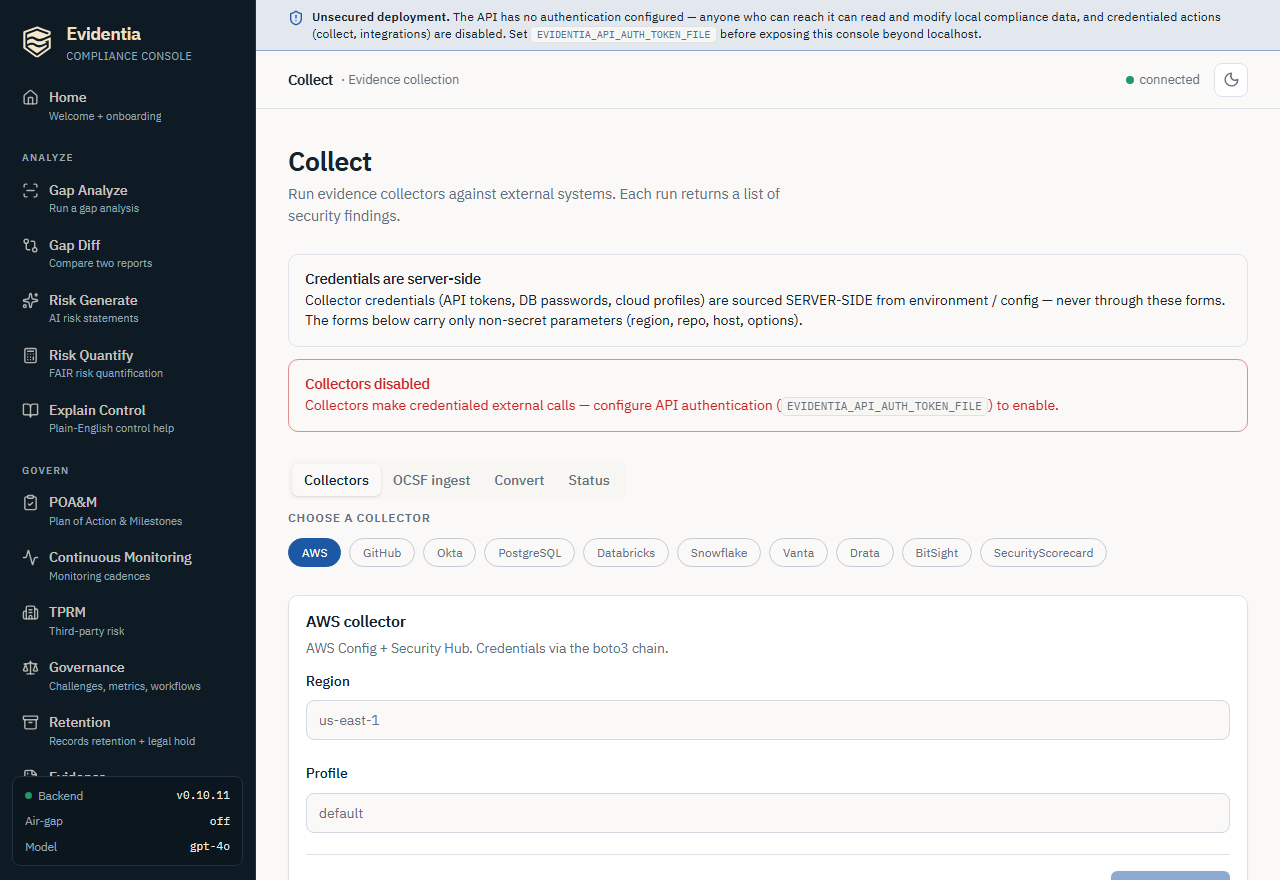
The auth gate (why your Run buttons may be disabled)¶
Collectors make credentialed, network-egressing calls, so the console refuses to
run them on an unauthenticated deployment. The page reads the backend's
auth_configured flag and, when it is false, shows a red "Collectors disabled"
banner and disables every credentialed Run button. To enable them, configure
API authentication by pointing EVIDENTIA_API_AUTH_TOKEN_FILE at a token file and
restarting evidentia serve. This mirrors the always-visible security-posture
banner — it is a §4(c) safeguard so that anyone who can reach the local API
cannot silently drive credentialed external calls.
Local parsing stays available without a configured AuthProvider: Convert, OCSF ingest with inline content, the Nessus and Greenbone export tabs, and Entra/M365 with only DLP export selected. Configured read-role checks still apply. The OCSF ingest URL mode is networked, so it is auth-gated like the credentialed collectors.
Collectors tab¶
- Choose a collector. Click a provider pill (AWS, GitHub, Okta, Google
Workspace, PostgreSQL, Databricks, Snowflake, Vanta, Drata, BitSight,
SecurityScorecard). Each card
says where its credentials come from (e.g. "Token via server
$GITHUB_TOKEN"). - Fill the non-secret parameters. The form carries only fields like region, repo, org URL, connection URI (without a password), or account/user — never a secret. Required fields are marked; the Run button stays disabled until they are filled (and until auth is configured).
- Confirm, then run. Because a run hits a live external API, the button is a two-step: clicking Run collector reveals a red Confirm — run collector button (and a Cancel). Confirming issues the run; the page shows Running… and then a finding count with per-finding cards (severity, source system, title, description, resource id). Errors — including the provider's own message — are surfaced inline as escaped text.
OCSF ingest tab¶
Choose Inline content (paste OCSF JSON — a single finding object or an array;
parsed locally, no network) or URL (fetch from an https:// endpoint). URL
mode shows a Block private IPs (SSRF guard) checkbox that is checked by
default; unchecking it pops a warning that the URL may resolve to a private /
loopback / link-local / metadata address — only opt out for a trusted internal
endpoint. Click Ingest OCSF to run.
Convert tab¶
Paste a findings document (a single SecurityFinding or an array), set the output
format (currently ocsf), and click Convert. This round-trips through the OCSF
mapping layer entirely locally — no network, no credentials — and prints the
converted JSON.
Status tab¶
Reports which collectors are installed and which credentials are configured on the server — as booleans plus the env-var name a token was sourced from. It never returns a token value. Use it to confirm a provider is ready before you try to run it.
Under the hood the console calls POST /api/collectors/<provider>/collect (and
/api/collectors/ocsf/collect, /api/collectors/convert,
GET /api/collectors/status) — the same engine the CLI drives, so the two paths
produce identical findings.
What's next¶
- Your first run, end to end: Getting started → Your first evidence collection.
- Turn findings into a gap report: Run a gap analysis.
- Round-trip OCSF: Ingest OCSF · Emit OCSF detection findings.
- Manage vendor risk from collector output: Manage third-party risk.
- Run everything offline: Air-gapped install.
- The full flag matrix: the CLI reference.
Got stuck?¶
- Console Run buttons are greyed out / "Collectors disabled" banner: the
deployment is unauthenticated. Set
EVIDENTIA_API_AUTH_TOKEN_FILEand restartevidentia serve, and front the console with a reverse proxy that injects the bearer header (the console sends none itself; see the serve guide). Local-only Convert and OCSF inline ingest stay enabled regardless. ... collector not installed. Run pip install ...— install the provider extra named in the message (e.g.evidentia-collectors[aws],evidentia-core[ocsf]).- "Env var '…' is not set or is empty" — the server has no credential for that provider. Export the named env var (CLI) or set it in the server environment (console) and re-run; confirm with the Status tab.
- An OCSF URL is refused / SSRF error — the host resolved to a private /
loopback / link-local / metadata address and the default guard blocked it. Use a
public URL, or pass
--allow-private-ips(CLI) / uncheck Block private IPs (console) only for a trusted internal endpoint. - A finding shows
compliance_status: unknown: inspect its source limitations and diagnostics. Some collectors use this for an indeterminate sub-check. Storage retention observations always retain unknown compliance status because configuration alone does not assess object enforcement.